EnvShareApp Enterprise Documentation
The definitive resource for security engineers, developers, and enterprise users. Everything from core cryptography to automated CLI pipelines.
1. Introduction
EnvShareApp is an end-to-encryption platform for sensitive strings and files. Unlike traditional storage, we never see your data. Encryption happens entirely within your execution environment (Browser, CLI, or SDK).
2. Authentication & Login
EnvShareApp uses a secure, passwordless authentication system. We support email-based OTP and social providers.
A Email OTP (Passwordless)
- Enter your valid email address on the Sign In page.
- Click Continue. We will send a 6-digit code to your inbox.
- Open your email (check Spam folder if missing) and copy the code.
- Paste the code into the verification box to log in.
B Social Login (Google / GitHub)
The fastest way to access your account.
- Click Continue with Google or Continue with GitHub.
- Authorize the EnvShareApp application in the pop-up window.
- You will be instantly logged in. No password required.
3. Identity & Workspaces
Your identity is tied to your email address, but your data lives in Workspaces. Everyone starts with a Personal Workspace, but you can create or join Organization Workspaces for team collaboration.
Personal Workspace
For individuals & freelancers
Free Tier
$0 / mo- Share text & code snippets
- No File Uploads
- Max expiry: 24 Hours
Pro Tier
$10 / mo- 7-Day Expiry Limits
- Dashboard & History
- 10MB File Uploads
Organization Workspace
For teams & enterprises
Team Tier
$25 / mo- Centralized Billing
- Unified Audit Logs
- Unlimited Members
Enterprise
Custom- SSO / SAML Integration
- Domain Lockdown
- Custom Retention Policies
Feature Comparison Matrix
Unified capability overview for different EnvShareApp personas.
| Feature | Free | Pro | Team | Enterprise |
|---|---|---|---|---|
| Secret Expiry | Max 1h | Max 7d | Unlimited | Custom Policy |
| File Uploads | None | 10MB | 50MB | Unlimited* |
| Secure Drop Boxes | — | 5 | Unlimited | Unlimited |
| Master Password | ||||
| Audit Logs | ||||
| Custom Branding | — | — | — |
6. Advanced Privacy (Pro)
EnvShareApp Pro is designed for power users who require absolute control over their ephemeral data. Beyond the standard encryption spec, Pro users gain access to secondary authentication layers.
Master Passwords
Enable human-memorized secrets as a salt for PBKDF2 derivation. Zero-knowledge by design.
Local History
Manage your active links within an encrypted session. Revoke access before expiry.
QR Code Sharing
Generate secure QR codes for physical/mobile handoffs. Perfect for 2FA setup or server keys.
7. Team Governance
The "Team" persona centralizes secret orchestration within organization boundaries. It replaces chaotic Slack/Teams sharing with a compliant, auditable infrastructure.
Admin Operations Manual
1. Creating a Workspace
Navigate to Manage > Team. Click Create Workspace and enter your Organization Name (e.g., "Acme Corp"). You automatically become the Owner.
2. Inviting Members
In the Team Dashboard, scroll to "Members" and click Add Member. Enter their email and select a role (Admin or Member). They will receive an invite.
3. Role Management
Members can share and view. Admins can invite/remove others. Owners handle billing and deletion.
4. Revoking Access
Click the Trash Icon next to a user in the Members list. This immediately revokes their access to the shared workspace and audit logs.
Workspaces & RBAC
Invite members to your dedicated Workspace. Enforce "Owner", "Admin", and "Member" roles to control who can purge logs or manage subscription settings.
Centralized Audit Logs
Every share and every view event is recorded with IP-level granularity. Perfect for SOC2 evidence collection or forensic analysis of data leaks.
Domain Lockdown
Restrict viewing to verified corporate email domains (e.g., @company.com). Enforce OTP-based identity verification before a secret can be decrypted.
5.2 Master Permission Matrix
Comprehensive access control reference for every role in the EnvShareApp ecosystem.
| Capability | Member | Admin | Owner |
|---|---|---|---|
| Workspace Actions | |||
| Create & Share Secrets | |||
| View Own History | |||
| Administration | |||
| Invite / Remove Members | — | ||
| View Global Audit Logs | — | ||
| Export Audit Logs (CSV) | — | ||
| Manage Billing & SSO | — | — | |
| Delete Workspace | — | — | |
4. How to Share
Content Input
Enter secrets manually in the browser or pipe them from your terminal. We support large multi-line strings up to 500KB.
Binary Attachments
Securely attach .env files, build artifacts, or certificates. Files are chunked and encrypted individually before transit.
5. Retrieval
Secrets can be accessed once through the secure URL anchor. The key is contained in the URL hash, which is never transmitted to our servers.
The Burn Mechanism
By default, secrets are "One-Time View". Once the decryption key is hit, the record is globally destroyed. No persistence, no backups.
Sync Key (for Secure Drop & Inbox)
Your Secure Drop Identity Key (private key) is generated in your browser and stored locally on that device. It is required to decrypt submissions in /inbox.
- Open Sync Key on your current device and copy your key.
- Open Sync Key on the new device/browser and paste the same key.
- Import and reload to access older encrypted submissions.
Important: If you lose this key, previously encrypted Secure Drop submissions cannot be decrypted or recovered.
CLI Reference
Share secrets directly from your terminal. Ideal for developers, DevOps, and automated CI/CD pipelines.
$ npx envshareapp upload .env$ npx envshareapp scan .env$ cat id_rsa.pub | npx envshareappAdvanced Flags
| Flag | Description |
|---|---|
| --expires-in | Time limit (e.g. 1h, 1d) |
| --password | Add secondary decryption password |
| --burn | Force one-time view only |
| scan | Scan files for secrets before upload |
8.2 Curl One-Liner (Zero-Installation)
The fastest way to share a secret without installing anything. Perfect for remote SSH sessions, quick scripts, or one-off shares.
Recommended: use the NPX CLI above for zero-knowledge, client-side encryption.
Before running a remote script, inspect it locally:
curl -fsSL https://envshare.app/share.sh | sed -n '1,200p' curl -fsSL https://envshare.app/share.sh -o share.sh && less share.sh # then run: bash share.sh
For self-hosted or staging deployments set ENVSHARE_HOST to your instance.
CLI Argument Support
You don't have to pipe. Pass the secret directly as an argument after the script execution string.
Clipboard Integration
The script automatically detects and utilizes your system clipboard on Mac and Linux.
Configuration Flags
-e, --expiryHoursSet the TTL for the secret link. Default: 24h.
-v, --viewsCountLimit number of views. Default: 1.
Security Architecture Notice: For maximum security and zero-knowledge guarantees, we recommend the NPX CLI which performs local client-side encryption. The Curl One-Liner uses server-side encryption for streamlined, zero-friction usage.
API Reference
Integrate EnvShareApp directly into your applications. All endpoints are rate-limited and require valid authentication tokens.
/api/shareCreate a new encrypted secret link.
curl -X POST https://envshare.app/api/share \
  -H "Content-Type: application/json" \
  -d '{
    "ciphertext": "U2FsdGVkX1...",
    "iv": "ab12...",
    "expires_at": "2026-02-20T12:00:00Z"
}'/api/retrieveRetrieve and burn a secret (requires ID).
curl -X GET https://envshare.app/api/retrieve?id=...
Official SDKs
Programmatic access for high-scale secret orchestration. Official libraries for Node.js, Python, and Go.
Node.js
Full TypeScript support. Uses native crypto module.
Python
Supports Python 3.8+. Zero external dependencies.
9. Security Architecture
This section details our implementation of the Galois/Counter Mode (GCM) for authenticated encryption.
Encryption Lifecycle
9.1 Cryptographic Primitives
| Component | Standard | Implementation |
|---|---|---|
| Cipher | AES-256-GCM | Web Crypto API |
| Derivation | PBKDF2 | 100k iterations / SHA-256 |
| Hashing | SHA-512 | For storage identifiers |
Enterprise Sovereignty
For peak data sovereignty, deploy EnvShareApp in your own cloud. Full support for AWS, GCP, Azure, and Air-Gapped environments.
SAML & Single Sign-On
Enterprise instances support SAML 2.0 and OIDC (OpenID Connect). Connect your Okta, Azure Active Directory, or Google Workspace to enforce identity-based access across the entire organization.
- Automated Provisioning (SCIM)
- JIT (Just-In-Time) User Creation
Quick Start (Docker)
git clone https://github.com/yocyberofficial/envshareapp
cd onprem
docker-compose up -d
10.2 Enterprise Compliance
SOC2 Type II
Audit logs are architected for continuous compliance. Immutable tracking of PII access events.
Air-Gapped Deployment
Deploy in offline, highly-secured VPCs. Supports local image registries and zero external egress.
10. Dashboard & Analytics
The Manage Dashboard is your command center for tracking shared secrets. It provides real-time analytics, an activity timeline, and powerful search capabilities.
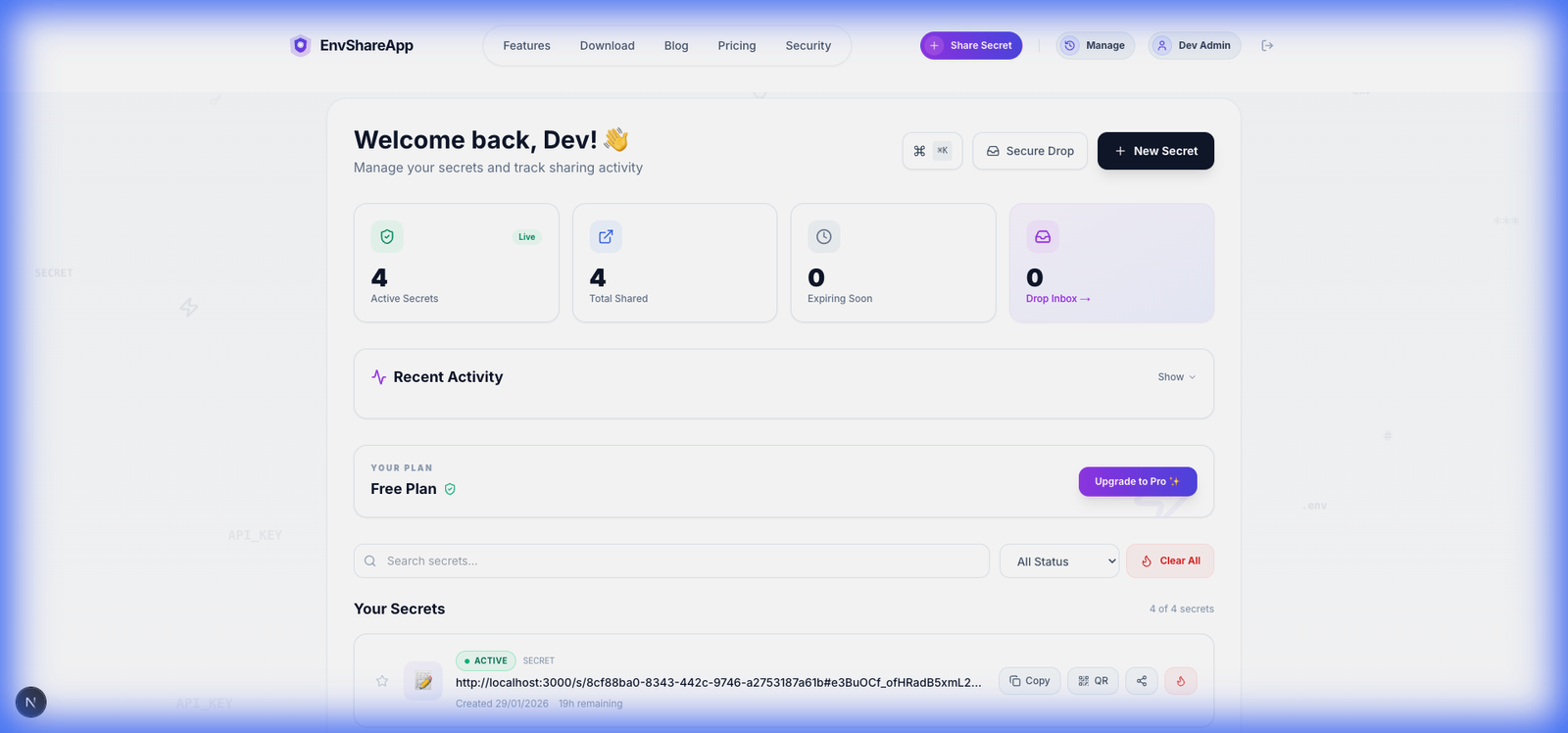
Real-Time Stats
At a glance, verify the health of your secrets:
- Active Secrets: Currently live and accessible links.
- Expiring Soon: Links less than 24 hours from auto-deletion.
- Total Shared: Aggregate count of all secrets ever generated.
Power Tools
Optimize your workflow with keyboard shortcuts and bulk actions:
- ⌘KCommand Palette: Instantly search secrets, navigation, or perform actions without leaving the keyboard.
- Burn Protocol: Manually revoke any active secret instantly. This produces a 404 for anyone trying to access it.
Administrative Override
For Team and Enterprise plans, Workspace Admins can view audit logs of who created what and when, but never the secret content itself.
11. Trust & Compliance
Data Residency
By default, encrypted blobs are stored in US-East-N. Virginia (AWS).
Certifications
- SOC2 Type II (Infrastructure)
- GDPR (Right to Erasure)
- HIPAA (BAA Available)
Incident Response & Disaster Recovery
RPO / RTO Goals
Targeting 1-hour RPO and 4-hour RTO for critical services in the event of catastrophic regional failure.
Vulnerability Mgmt
Codebase is scanned weekly. Critical patches deployed within 24h. Responsible disclosure via security@envshare.app.
Access Control
Zero-Trust network architecture. Production access requires Hardware MFA and VPN. No standing permissions.
12. Troubleshooting
Error 404: Secret Not Found
- The secret has expired (Time-To-Live passed).
- The secret was already viewed (Burn-on-read).
- The secret was manually incinerated by the sender.
Decryption Failed / Invalid Password
- Incorrect secondary password provided.
- URL fragment (hash) was truncated during copy-paste.
- Browser extension interfering with DOM crypto.
Error 403: Domain Restricted
This secret is locked to a specific Organization (e.g., @acme.com). Please Log In with your corporate email to verify identity and unlock the secret.
12. Persona-Specific FAQ
For the End-User
Q: I lost my Master Password, can you recover it?
A: No. We are Zero-Knowledge. If you lose your secondary password, the secret is permanently lost. Always use a password manager.
Q: Why does the link say "Not Found"?
A: It was likely a "one-time view" secret that has already been accessed, or the expiry time has passed.
For the CISO / Security Mgr
Q: How do we prevent exfiltration to personal links?
A: Use Domain Lockdown to restrict viewing to corporate domains and Audit Logs to monitor all view events with IP metadata.
Q: Is EnvShareApp SOC2 Type II compliant?
A: Our infrastructure is SOC2 evaluated. The software itself is open-source and architected for immutable audit trails.
For the Product Manager
Q: Can we white-label the sharing experience?
A: Yes, Enterprise customers can use Custom Branding to replace our logo and colors with their corporate identity.
Q: How do we manage seat counts?
A: Team admins can add/remove members from the Workspace dashboard. Invoicing is consolidated into a single monthly bill.
Need Enterprise assistance?
Custom deployment models and dedicated SLAs for large-scale operations.